
Data Protection Rules
Data Protection Rules
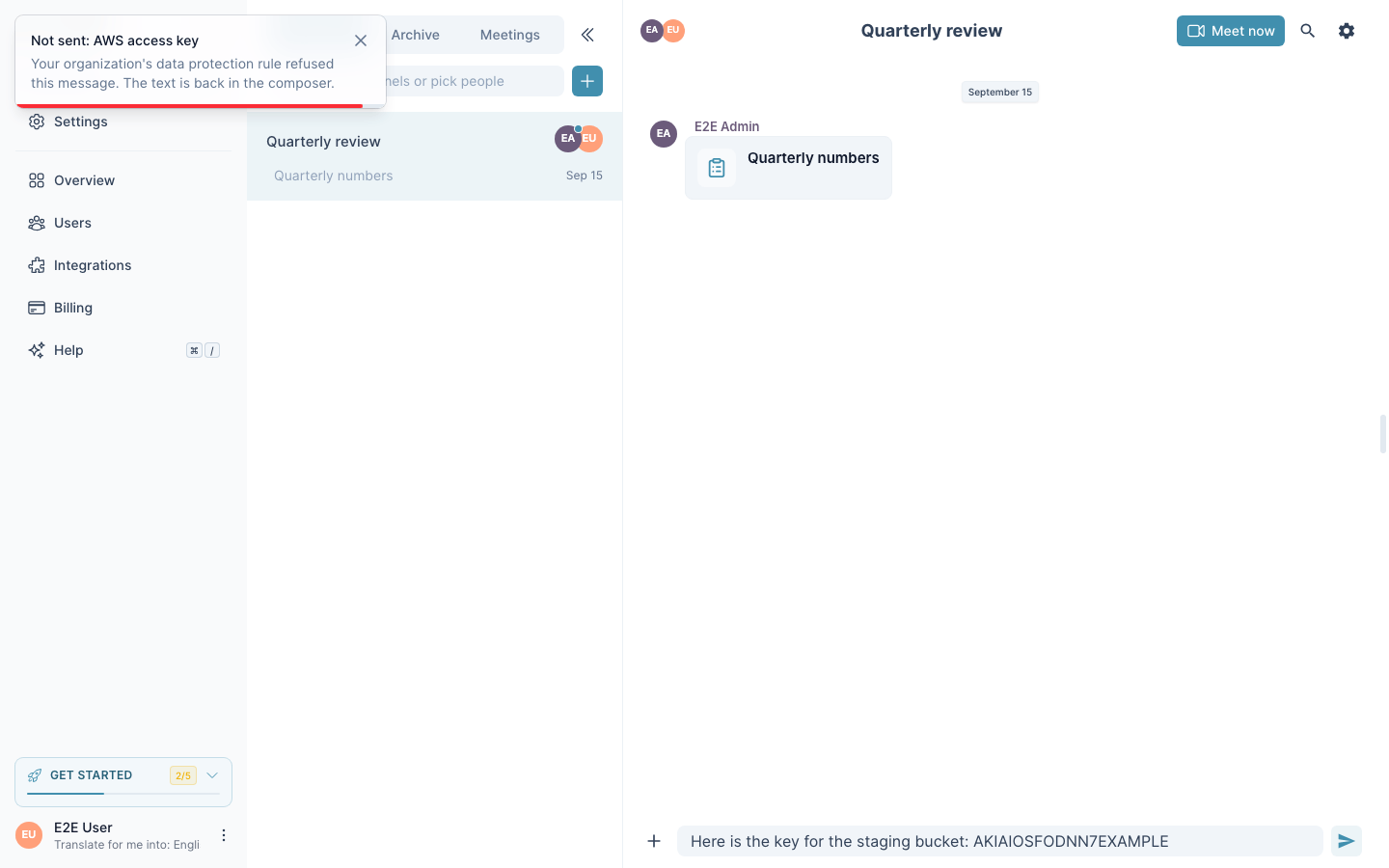
A chat where every member reads in their own language is still a chat where someone pastes an access key, a customer's card number or a contract reference by habit. Data protection rules check every message of your organization's meetings and channels before it is sent. The check is a list of rules, not a judgement: when a message is refused, the rule that refused it is named, and the same text is refused the same way tomorrow.
Data protection rules are included on the Business and Enterprise plans. Members on other plans see no rules and no refusals.
What Is Checked
A rule is either a pattern (a regular expression) or a list of exact words, with one of three actions:
- Block — the message never leaves. The sender sees which rule refused it and the text stays in the composer.
- Warn — the sender may send anyway with a reason. The reason is written to the organization's audit log together with the rule.
- Audit — the message goes, and the audit log keeps a row that it did.
A warn rule becomes block while the room holds someone outside the organization: a guest who joined by link, or a participant from another organization.
Editing a sent message runs the same rules on the new text. An edit carries no reason, so a warn rule refuses the edit outright: the editor keeps your text, and to send it with a reason you send it as a new message. Invisible characters and look-alike digits inside a key or a number do not hide it from the rules.
Every organization starts with the built-in rules: cloud and API keys (AWS, Google, GitHub, Slack, Stripe, OpenAI, Anthropic), private keys in PEM, JSON Web Tokens, payment card numbers and IBANs. Keys block; card numbers and IBANs warn. The owner may change the action of a built-in rule or turn it off.
Teaching a Rule From a Message
The organization's owner or an admin opens the menu of a chat message and chooses Protect data like this. InterMIND reads the message and proposes a rule: what it protects, a pattern or the exact words, and an action. You edit the proposal and save it. From the next message on, every member's messages are checked against it.
A rule must match the message it was taught on; a rule with the same name replaces the earlier one.
Teaching Rules From a File
In Claude, ChatGPT, Copilot or Gemini connected to InterMIND, hand the assistant your list — a table, a spreadsheet, a policy document — and say what must not leave the organization. The assistant writes the rules through add_dlp_rules, shows them with list_dlp_rules and drops one with remove_dlp_rule. The same three calls are in the public API under /api/v1/dlp.
What Is Logged
Refusals, overrides with their reasons, audit-only matches and every change of a rule are rows of the organization's audit log: chat.dlp_blocked, chat.dlp_overridden, chat.dlp_flagged, chat.dlp_rule_changed. The row names the rule, the sender and a masked sample of what matched — never the whole message.