
Document Translation
Document Translation
Documents shared in chat can be read in your own language. When you open a file someone else uploaded, InterMIND translates it into your language first — there is no button to press. Formats, plans, and a demo are on the Document Translation feature page.
How It Works
- A participant shares a document in chat
- You click it to open
- If it's in another language, the tile shows Translating document…
- The translated copy opens, marked Translated
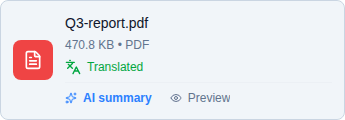
The sender always sees the original, and if the document is already in your language nothing is translated. Once translated, the copy is cached — reopening it is instant, and so is opening it for teammates with the same language.
Supported Formats
PDF, DOCX, DOC, PPTX, and XLSX, translated into 30 languages via DeepL. Other file types open as-is.
Plans & Limits
Document translation is a paid feature, metered per distinct document over a rolling 30-day window:
| Plan | Documents / 30 days |
|---|---|
| 🆓 Basic | Not available |
| ⭐ Pro | 10 |
| 🏢 Business | 30 |
| 🏛️ Enterprise | 100 |
- Usage counts against the meeting host's plan, whoever opens the document
- Re-translating the same file into additional languages is free — the meter counts distinct files
- Track usage on the Billing page under the Document Translation meter — see Usage & Invoices
When the quota is reached — or on the Basic plan — the original file still opens, just untranslated.
Related
- File Sharing — Upload and link documents in chat
- Document Summaries — The key points of every shared document, in your language
- Sharing Documents & Notes In-Call — Open a document for the whole conference
- Usage & Invoices — All usage meters in one place