
Team Audit Log
Team Audit Log
InterMIND keeps an audit trail of security-relevant actions in your team. Every event is recorded with the actor, the timestamp, and the affected target, so an admin can answer "who did what, and when" — for internal review or a compliance questionnaire.
Availability: Pro, Business, and Enterprise plans. Only team owners and admins can export the log.
What is recorded
| Event | Details captured |
|---|---|
| Sign-in / sign-out | Method: SSO, Google/Microsoft account, email code, or mobile |
| Member joined | Via invitation link or a named email invite |
| Member removed | Including self-leave |
| Role changed | Previous and new role, who changed it |
| Invitation created | Invited email address |
| Invitation revoked | Which invitation |
| Team settings changed | Which fields were changed |
| Plan changed | New plan and seat count (recorded by the billing system) |
Audit writes never block the action they document — they are a record, not a gate.
Exporting the log
- Open the Users page (you need the owner or admin role).
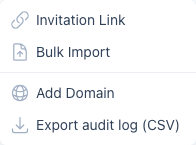
- Click the Invite Users dropdown → Export audit log (CSV).
The export covers the last 90 days by default and up to one year on request (?days=366 on the export URL). Each CSV row carries the timestamp, action, actor id and email, target id, and a details column with the event metadata. A JSON format is available with ?format=json.
Audit log and SSO
If your team uses Single Sign-On, every SSO sign-in lands in the audit log as auth.login with method sso — SSO itself is a Business/Enterprise feature, while the audit log is available from the Pro plan.