Inside the four translation pipelines that run InterMIND
The Mind.com Team
Inside the four translation pipelines that run InterMIND
The old /product/overview/how-it-works page on mind.com is several major releases out of date. It describes a single "translation engine" the way most vendor pages do — one big arrow from "you speak" to "they hear." That picture was already a simplification two years ago. Today it is wrong.
The truth is that InterMIND runs four separate translation pipelines, each solving a different problem with a different engine, a different latency budget, and a different quality envelope. They share a language picker. They do not share an engine.
This is the updated answer to "how does it work."
A companion piece: "How many languages do you support?" covers what each pipeline covers (24 / 21 / 30 / 6). This post covers what each pipeline does — and why it is its own thing.
Why "one engine for everything" is a lie
A live meeting platform has at least four jobs to do at once, and they pull in incompatible directions:
- Real-time voice — audio in, translated audio out, under one second, every viewer in their own language. The hard constraint is latency.
- Real-time chat text — short messages, fast, with edits and quotes and HTML structure preserved.
- Real-time shared notes — character-by-character collaborative typing, with structural hierarchy (lists, headings, checkboxes) that has to survive translation.
- Asynchronous document files — a 40-page PDF dropped into chat. No latency budget. The hard constraint is fidelity — formatting, tables, page numbers, font.
You can build one giant LLM call that tries to do all four. We tried. It is bad at all four. The latency budget for voice means the model can't think; the fidelity budget for documents means the model has to. A chat edit needs a diff in the viewer's language; a 40-page PDF needs format preservation that no token-streaming model gives you.
So we run four. Here is each one.
Pipeline 1: Real-time voice translation
The problem: A participant speaks French. Another participant joined in German, a third in Brazilian Portuguese, a fourth in Japanese. Each one needs to hear the speaker in their own language, in their own ear, with a delay short enough to keep eye contact possible.
The budget: Sub-second end-to-end. Anything past ~1.2 seconds and the conversation breaks — people start talking over the translation, and the meeting drifts toward "let's just switch to English."
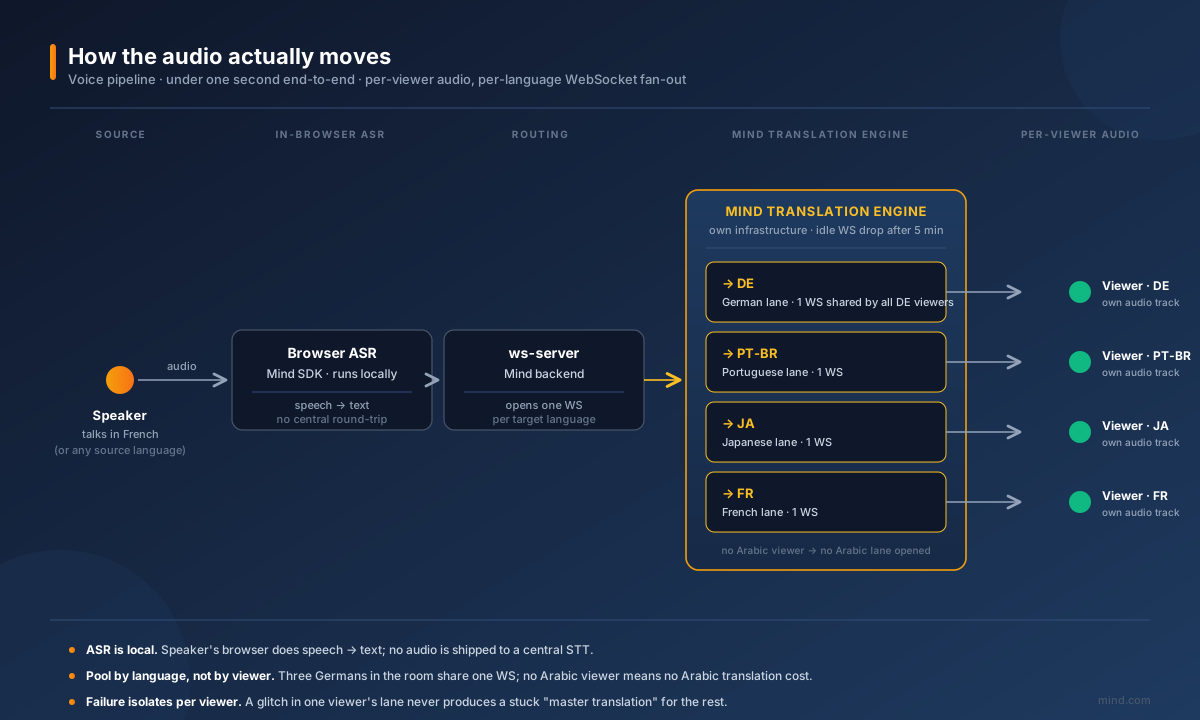
How the audio actually moves
A few things worth naming explicitly:
- ASR runs in the speaker's browser, not on a central server. We use the Mind SDK locally; this saves a round-trip and gives us the source-language transcript with the lowest possible delay before translation can even start.
- Translation is not one fan-out. We hold a pool of WebSocket connections to our translation engine, one per target language present in the room. If three participants picked German, German shares one connection. If nobody picked Arabic, no Arabic connection is opened. The pool drops idle connections after five minutes. This is why a four-language meeting costs the same as a forty-language meeting up to the point of who actually showed up — we never translate to languages no participant is listening in.
- Synthesized speech is per-viewer. Each participant receives their own translated audio track, mixed against the original speaker's video. They are not watching a master "translated meeting" — they are watching the same meeting, with their personal audio channel translated to their picked language. This is why two people in the same physical room can each plug in headphones and hear different languages.
Why this matters when a meeting goes sideways
In a 40-minute call with eight languages, things break in interesting ways: WebSockets drop, ASR temporarily mis-transcribes a proper noun, one participant's network gets jittery. The architecture above is what lets us isolate failures: one viewer's audio glitching does not affect the other seven, because the translation engine never produced "the translation" in the first place — it produced eight, in parallel, and only the affected one has to recover.
The engine itself is ours, hosted on our own infrastructure. We do not route real-time voice through third-party general-purpose LLMs. The latency budget rules them out; the data-residency story rules them out for the regulated customers who actually care.
What we publish about voice quality: /benchmark runs the production voice pipeline against FLORES-200 sentences for every published language pair, monthly. The judge is named (Gemini 2.5 Flash primary, Claude Sonnet 4 fallback). The full distribution — median, p10, p90, min, max, sample size — is on the page. See the methodology for what those numbers do and don't measure.
Pipeline 2: Real-time chat translation
The problem: Every chat message in the meeting, translated for every participant in their own language, as it is sent. Plus edits — and edits need to look like edits, not like re-translations.
The budget: Fast, but not sub-second. A chat message can take half a second to appear in another language without anyone caring. What people care about is whether the translation is right and whether edits make sense.
What the chat pipeline actually does
Each message goes through the same translation engine the voice pipeline uses — but with different pre- and post-processing:
- HTML structure is preserved. Chat supports rich text (paragraphs, lists, quotes, bold, italic). We convert to plain text for the model, translate, then re-wrap the result in the original tags. The model never sees the HTML — it sees clean prose.
- Quotes are translated independently. If you reply to a message and quote it, the
[QUOTE]…[/QUOTE]block and the new content are translated as separate units, so the model can't confuse the two. - Long messages get chunked. We split on paragraph boundaries at 1,000 characters per chunk. Each chunk is its own translation call. We do not feed 4,000-character novels to the model in one shot — the failure modes (truncation, lost paragraphs, mid-sentence cut-offs) are too ugly.
- Translation is lazy. We use an IntersectionObserver: a message is only translated when it scrolls into the viewer's viewport. Switching languages in a long-running channel used to replay every translation API call from the history. Now it doesn't.
The interesting part: edits as diffs
In v1.2 we changed how chat edits behave for viewers in another language. The old behavior was: someone edits a message, we re-translate the whole thing, you see a fresh paragraph and have to spot what moved.
The new behavior:
- The original message was already translated to your language.
- When the sender edits, we re-translate the new version.
- We compute the diff between your previous translation and your new translation, in your language.
- We show that diff inline — same way Git shows you what changed.
So when "review by Tuesday" becomes "review by Thursday" in English, your Spanish-reading colleague sees martes → jueves highlighted, not a re-translated paragraph they have to re-read.
This required treating the chat pipeline as a stateful per-viewer cache, not a stateless translate-on-request endpoint. Documents and voice don't need this. Chat does.
Pipeline 3: Real-time shared-notes translation
The problem: The host opens a shared-notes pane and starts typing. Every participant sees the notes in their language, character-by-character, with the structure of the document — headings, nested lists, checklists, code blocks — intact.
The budget: Same as chat (~half a second), but with two extra constraints:
- The thing being translated changes mid-translation. The host is still typing. A naive system that translates "the whole document" each keystroke produces flicker and burns the API budget. We translate at the granularity of the changed unit, not the whole document.
- Structure must survive. If you ask a translation model to translate a markdown blob with three nested lists, you get back something that looks like the original but with subtly flattened hierarchy, renumbered items, or moved indentation. We do not let the model see the whole blob.
How the notes pipeline differs from chat
The structural preservation is the main thing. We translate each list item independently rather than as one document. The model sees:
"Compliance review — Q2 deliverables"
— not:
"# Project plan\n## Quarter\n- Compliance review — Q2 deliverables\n- Vendor scoring\n - Tier 1 vendors..."
The wrapping document — the <ul>, the headings, the indentation — is rebuilt on the client side using the same structure the original document had, with each leaf node swapped for its translation. The model never gets to "improve" the hierarchy.
Notes also use the same per-viewer diff model as chat edits: if the host changes a line, viewers in other languages see the changed words highlighted, not a fresh paragraph.
Pipeline 4: Asynchronous document translation
The problem: Someone drops a 40-page PDF, a Word doc, a PowerPoint deck, or an Excel sheet into chat. Each participant can request a copy in their own language. The translated file must look like the original — same fonts, same tables, same page numbers, same headers, same charts in place.
The budget: No real-time constraint. A minute is fine. Two minutes is fine. The constraint is fidelity — if the translated PDF doesn't look like the original, the recipient won't trust it.
Why this pipeline does not share an engine with voice
A general LLM, even a very good one, will hand you back a translated text of a document. It will not hand you back a translated PDF with the same layout. The model has no concept of "page break that has to line up with the source" or "table cell that has to keep its column width."
For this surface we use the DeepL Document API directly. It is purpose-built for translating files as files, not prose extracted from files. DeepL handles:
- PDF (with layout preservation)
- DOCX, DOC
- PPTX
- XLSX
The document is uploaded to DeepL's pipeline, translated server-side with formatting intact, and returned as the same format. We then upload the result to our object storage and surface it back in chat as a downloadable attachment.
What this costs and why we don't hide it
DeepL bills a minimum of 50,000 characters per document — roughly one US dollar per file on the Pro tier, regardless of whether the document is one page or thirty. We absorb that cost rather than charging per file; it shows up in the meeting's translation usage as billed characters, converted to word-units that match the way the rest of the product reports translation activity.
We picked DeepL for this surface because it is the best-in-class engine for document translation specifically. We do not pretend to have built a better one. The same is not true the other way around — DeepL does not run a live-voice pipeline of the kind we built for meetings. Different problems; different tools. The honest version of "what powers InterMIND translation" is "the right engine per pipeline" — not "our engine, everywhere."
Languages this pipeline covers that voice does not
The document pipeline reaches 30 languages, vs. 21 for voice. The extra nine include: Bulgarian, Greek, Estonian, Indonesian, Lithuanian, Latvian, Norwegian Bokmål, Slovak, Slovenian — plus Arabic and Turkish, which we hide from the real-time picker because the voice quality doesn't clear our bar but which DeepL handles well as documents.
That asymmetry is real. It means a French participant in a meeting can request the contract PDF in Estonian even though they cannot listen to the meeting in Estonian. We flag it in the picker rather than smooth it over with a single number. The reasoning is in the language-count post.
Where the pipelines meet
The four pipelines do not run in isolation. A meeting room is where they touch each other, and the seams matter:
- A chat message with a document attachment triggers the chat pipeline for the text and the document pipeline for the file. The participant in another language sees the message translated immediately and the attachment translation arriving asynchronously as a downloadable.
- A shared note that quotes a transcript line crosses notes ↔ voice. The transcript is what the voice pipeline produced for the sender's language; the note translation produces a per-viewer copy of that quote in everyone else's language, with its source attribution preserved.
- A transcript exported after the meeting runs the chat-style text pipeline over the full conversation, producing a per-language file that participants can download. This is the same code path as chat translation, just batched.
The language picker is one piece of UI. The infrastructure underneath is four pipelines, talking to each other.
What we deliberately do not try
- No "unified translation model." We are not building one model that does voice, chat, notes, and documents. The latency vs. fidelity trade-off doesn't have a winner. We use the right engine per surface.
- No silent re-routing. If voice can't translate to Hindi today, we don't quietly fall back to the document engine and pretend it worked. Hindi is hidden from the picker on both surfaces because the result on either surface today is not shippable.
- No "we translate to 200 languages." Our engine emits 24. Our product ships 21 on the live surfaces and 30 on documents. The marketing-friendly bigger number is just the engine ceiling. The product number is what actually meets the bar in front of an auditor.
Try it yourself
/demo— runs the live voice pipeline against your audio, in any of the 21 product languages. The same pipeline that scores/benchmark./benchmark— per-pair, per-month quality on real traffic. Includes the pairs we deliberately hide from the picker, deep-linkable./benchmark/methodology— what the numbers are, what they aren't, who the judge is.
Four pipelines, four engines, one meeting room. That is the honest replacement for the old how-it-works page.
— The Mind.com Team
"How many languages do you support?" — and why our honest answer is six numbers, not one
Every vendor quotes one language count. We can't, because translation isn't one product. Here is the per-surface breakdown for InterMIND — what is filtered, why, and what we publish on the website.
Why translation-quality marketing is broken — and what we publish instead
Every translation vendor publishes language counts. None publishes verifiable per-pair quality on real traffic. Why that gap matters in your next procurement evaluation — and what we publish instead.